
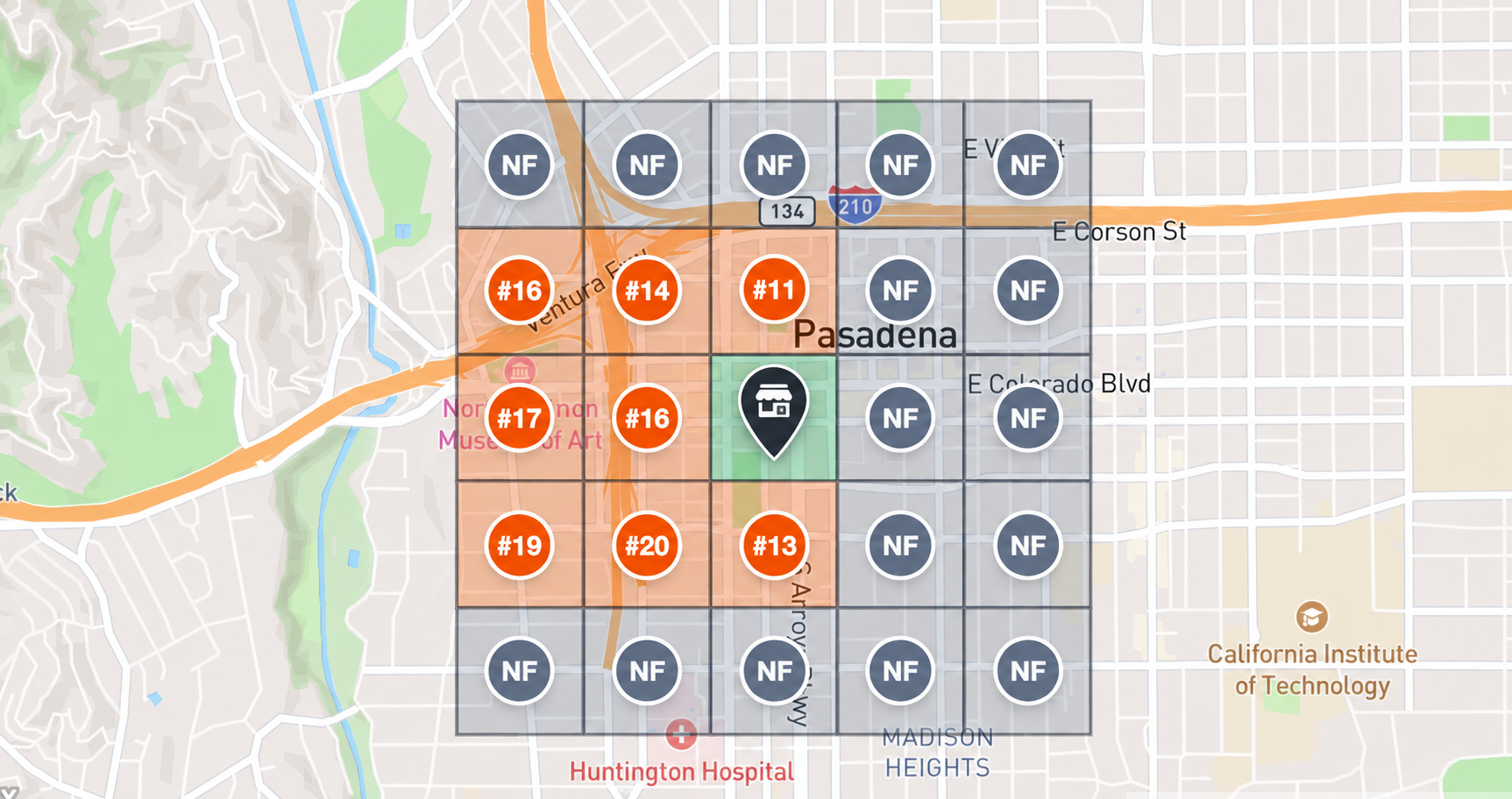
Before review management
Low rankings and “not found” across the search area
The first Google Maps rank scan shows some grid points at #11–#20 and others as NF (not found).
Review monitoring software should help local businesses track every review, everywhere it appears and every moment it matters. See what customers keep saying, where nearby competitors earn more trust, and which review or reputation action deserves attention first.
Review monitoring, competitor review tracking, sentiment themes, human-approved replies, and like-for-like rechecks in one workflow.
Product preview with sample values.
Connect review management to local search without guessing. LocalCMO combines review monitoring, competitor review tracking, and Google Maps rank tracking so a business can compare public reputation signals with the same local keyword and search grid before and after approved work.
Same local keyword · same search grid · same area · before / after recheckThe first Google Maps rank scan shows some grid points at #11–#20 and others as NF (not found).
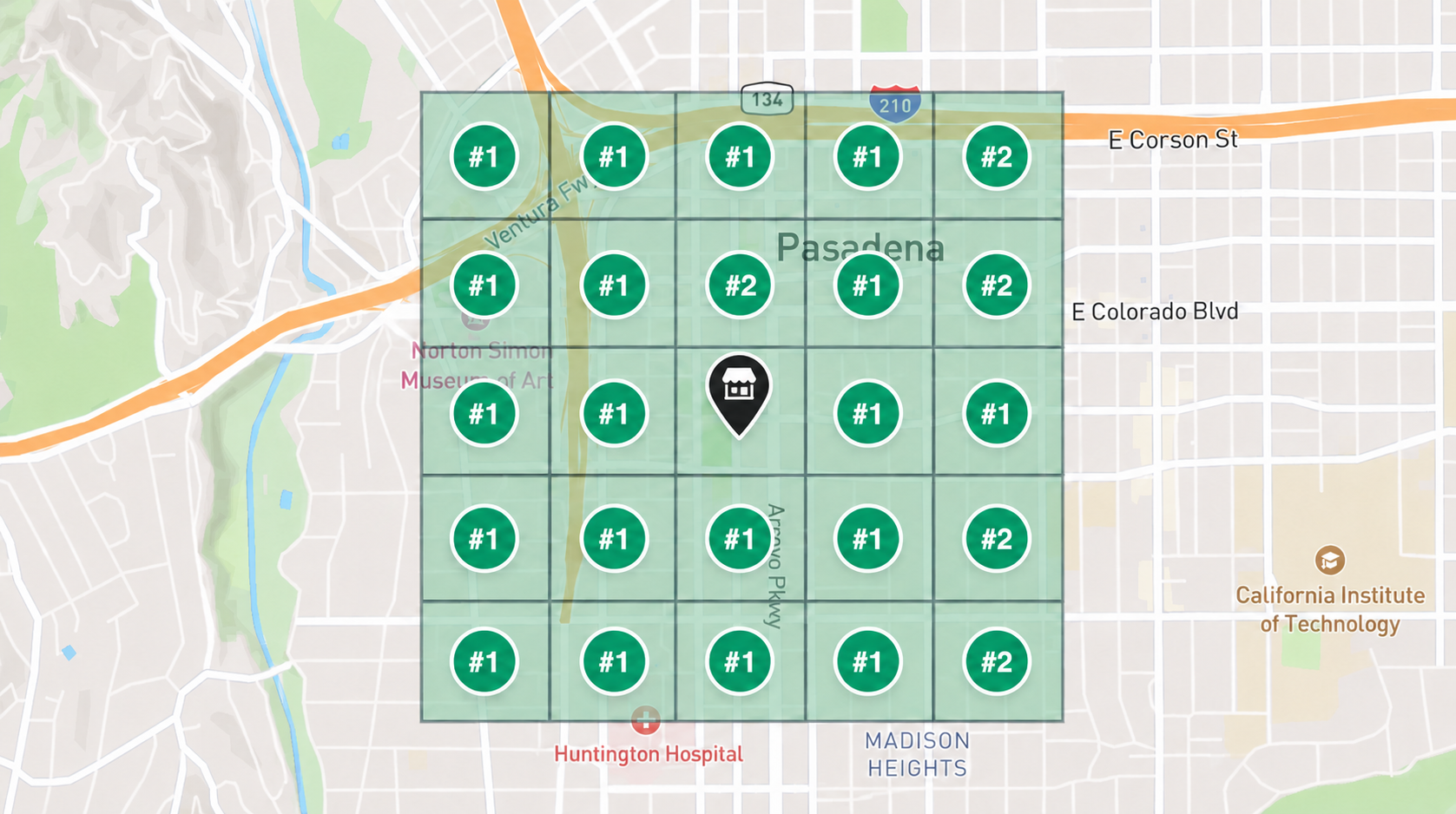
The second Google Maps rank scan uses the same local keyword and grid. Most points now show position #1 or #2, making the change easy to compare.
Local customers read recent experiences, look for repeated problems, notice whether a business replies, and compare that public evidence with nearby alternatives.
LocalCMO turns those visible signals into a clear, reviewable next action.
Review management software should help a business understand the public decision signals customers already use—not bury them under a generic score.
A 4.4 rating can mean very different things depending on review volume, recency, and what customers repeatedly say.
Fresh comments help customers understand what the experience is like now—not what it was several years ago.
A clear, useful response can explain what happened, move a sensitive issue into the right channel, and show future customers how the business handles feedback.
When several customers mention booking confusion, wait times, parking, or the same service gap, the next action may need to happen inside the business—not only in a reply.
Customers often see several local businesses together. Rating, review freshness, response habits, and recurring praise can make one option feel easier to trust.
Safety, discrimination, legal threats, refunds, privacy, or health-related claims should be escalated instead of answered by a generic automatic response.
Each part of the workflow answers a plain business question and keeps the source evidence beside the recommendation.
See new and unresolved customer feedback without checking every profile one by one. Keep the original review, source, date, rating, location, and response status together so the next person has the full context.
Compare your business with the local alternatives customers actually see. Review competitor ratings, volume, recency, response coverage, and repeated themes—then focus on a gap your team can genuinely improve.
Visible gap: recent response coverage
Group repeated praise, questions, and complaints into plain-language themes such as booking, staff, service quality, price, wait time, parking, or atmosphere. Open the source reviews whenever a summary needs human judgment.
A review does not always need the same response. LocalCMO can prepare a reply, suggest a listing or website correction, create an internal service task, or send a sensitive issue to the right person for review.
Review the original comment, suggested reply, location, tone, claim, and risk level before anything is published. Teams can edit, approve, reject, or escalate the work while preserving a clear record of the decision.
“Thank you for letting us know. We are checking what happened with the booking update and will contact you directly today.”
After approved work is completed, compare the same locations, sources, and time windows again. Track rating, volume, recency, response coverage, unresolved themes, and visible competitor gaps without claiming unverified visits or revenue.
The useful question is what the customer feedback requires next. A public response may be enough. A repeated issue may need a service change, a clearer website answer, corrected business information, or a social post that answers the question before someone asks.
See the review, understand the repeated issue, prepare the right next action, and approve it without turning review management into another full-time inbox.
Compare review freshness, response coverage, themes, and risk by location while keeping headquarters rules and local context visible.
Show the original feedback, nearby benchmark, recommended work, approval status, and like-for-like recheck in one accountable workflow.
Review analytics can show rating, volume, recency, response coverage, response time, themes, approved actions, and connected clicks when configured. They do not prove store visits or revenue without direct attribution.
Page reviewed September 9, 2026 · Product claims require current capability verification before publication.Plain-language answers for local businesses, multi-location teams, and agencies.
Review monitoring software helps a business find, organize, and act on customer reviews across supported sources. A useful workflow keeps each original review, source, date, rating, location, response status, and next action together.
Review management focuses on collecting, monitoring, replying to, and learning from customer reviews. Reputation management software can cover a wider set of public trust signals. On this page, the practical focus is review monitoring, competitor comparison, response approval, and evidence-backed follow-up.
The same public signals are compared across the local businesses customers are likely to consider: rating, review volume, recency, response coverage, and repeated customer themes. The comparison shows a visible difference, not a guaranteed reason one business ranks or sells more.
Review sentiment analysis groups comments into positive, neutral, or negative language and identifies repeated topics. It can make a large review set easier to read, but important conclusions should still be checked against the original comments.
A draft can speed up routine work, but not every review should be handled automatically. Sensitive feedback, factual disputes, legal or health claims, refunds, privacy issues, and serious complaints should be reviewed or escalated by a person.
The workflow is designed to keep location-level reviews and themes visible while allowing a central team to set rules, assign owners, review exceptions, and compare the same metrics across locations.
No. Review monitoring helps teams understand and respond to feedback that already exists. Review generation helps eligible customers share honest feedback through compliant request workflows. The two tasks should remain separate and neither should use review gating.
No. Reviews can influence customer trust and are one of many signals connected with local visibility, but no review management platform can guarantee a Google Maps ranking. Measure review changes and local ranking changes separately.
A business can observe review volume, rating, recency, response coverage, themes, response time, and connected clicks or actions when configured. Store visits and revenue remain unknown unless the business has direct attribution data.
Bring customer feedback, nearby competitor evidence, response drafts, operational fixes, human approval, and like-for-like rechecks into one reputation management workflow.